Text to Speech Software: What Professionals Need to Know

Text-to-speech (TTS) software is an AI-powered technology that converts digital text into natural-sounding spoken audio. Modern TTS systems use neural networks and deep learning to produce speech with realistic intonation, emotional range, and natural pacing. This is not the robotic “read aloud” of older screen readers. Today’s best speech synthesis programs handle everything from X threads to long-form newsletters, turning your reading pile into a listenable audio stream you can consume while commuting, working out, or cooking.
What modern TTS software supports:
- Multiple voices, languages, and regional accents
- Input formats including blogs, RSS feeds, social media posts, and newsletters
- API integration with apps and professional workflows
- Adjustable playback speed, pitch, and narration style
- Accessibility features for users with dyslexia or visual impairments
Table of Contents
- How modern text-to-speech technology actually works
- Key professional use cases for TTS in 2026
- What to look for in a high-quality TTS solution
- How Whisprstream brings TTS together for professionals
- The underlying technologies powering modern TTS
- How TTS integrates with your professional tools
- Accessibility benefits and compliance considerations
- Key Takeaways
- Whisprstream: your audio station for everything you read
How modern text-to-speech technology actually works
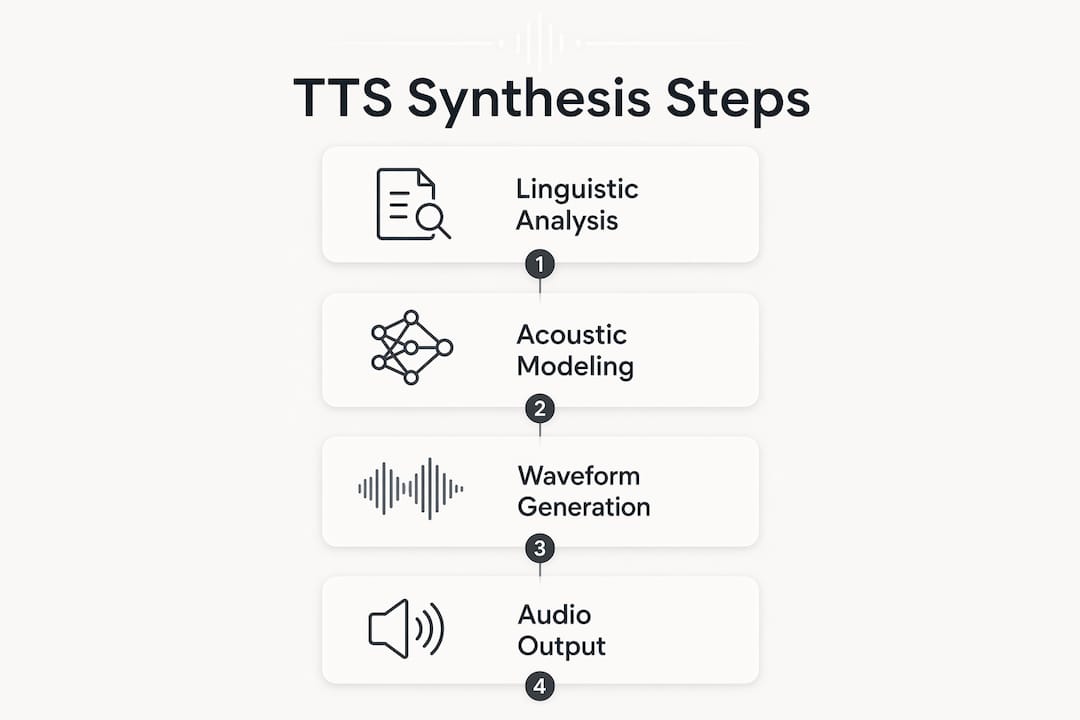
The two-step synthesis process behind today’s TTS is worth understanding. First, a linguistic analysis network processes the text, parsing punctuation, sentence structure, and word relationships to produce time-aligned features like mel spectrograms. Second, a vocoder network converts those features into audio waveforms. Models like Tacotron2 handle the first step; neural vocoders like Wave Glow handle the second.
What this means for you as a professional: the output sounds genuinely human. Generative AI models can now adjust delivery based on emotional cues in the text, so a tense news article sounds different from a casual blog post. Advanced platforms also support SSML (Speech Synthesis Markup Language), which lets you fine-tune pauses, emphasis, and pronunciation for technical terms or brand names.
Key capabilities in 2026-standard TTS tools:
- Emotional and contextual delivery that adapts to content type
- Voice cloning from short audio samples
- Adjustable pitch, speed, and speaking style
- SSML controls for pronunciation accuracy
- Low-latency streaming for real-time applications
Pro Tip: If your content includes industry jargon, acronyms, or brand names, use SSML tags to define custom pronunciations before you publish. Mispronounced terms break listener trust fast.
Key professional use cases for TTS in 2026
The shift from reading to listening is one of the clearest productivity trends reshaping how professionals consume information. Instead of scrolling through feeds at your desk, you can listen to curated audio stations during your commute or workout. TTS makes that possible at scale.
Professionals use text-to-speech applications across a range of workflows:
- Multitasking: Listen to blogs, newsletters, and social threads while doing other tasks
- Audio stations: Combine RSS feeds, X accounts, and articles into one continuous stream
- Accessibility: Support team members or audiences with dyslexia or reading disabilities, aided by resources like assistive technology guides
- Podcast app integration: Subscribe to AI-narrated content in Overcast or Apple Podcasts
- Workflow embedding: Add audio players directly to blogs or internal knowledge bases
Free tools work for occasional personal use. For professional contexts, paid platforms deliver higher voice quality and commercial usage rights that free tiers typically exclude.
What to look for in a high-quality TTS solution
Not all speech synthesis programs are built for professional workloads. The gap between a free browser extension and a paid platform shows up quickly when you need consistent, high-fidelity audio at volume.
Evaluate any TTS solution on these criteria:
- Voice naturalness: Does it handle long-form content without sounding flat or monotone?
- Emotional awareness: Does narration adapt to content tone, not just read words?
- Commercial licensing: Free plans often restrict business distribution; verify rights before publishing
- API access: Can you integrate it into your existing tools and workflows?
- Volume handling: Heavy professional use can exceed basic plan limits quickly
- SSML support: Fine-grained control over pronunciation and pacing
Pro Tip: Estimate your monthly character volume before choosing a plan. Subscription tiers based on character limits can become expensive fast if you’re converting full RSS feeds or long newsletters daily.
How Whisprstream brings TTS together for professionals
Whisprstream is built specifically for the use case most TTS tools ignore: turning your entire content diet into a continuous, personalized AI audio station. Connect your X account, paste an RSS feed, or add individual article URLs, and Whisprstream assembles them into a narrated stream with no awkward pauses between sources.
What sets it apart from generic TTS tools:
- Converts X threads, RSS feeds, blogs, and newsletters into one cohesive audio experience
- Natural-sounding AI narration that transitions smoothly across content types
- Playlist creation, bookmarking, and shareable public stations
- Embeddable audio players for blogs and websites
- Podcast app integration so you can listen in Overcast or Apple Podcasts
- Playback controls across devices for true on-the-go listening
For professionals who want to turn web articles into audio without managing separate tools for each source, Whisprstream handles the aggregation and narration in one place.
The underlying technologies powering modern TTS

TTS technology originated as assistive tech for users with visual impairments and reading disabilities. The early systems used concatenative synthesis, stitching together pre-recorded phoneme segments. The result was functional but obviously mechanical.
Neural network-based synthesis replaced that approach. Parametric models learn from large audio datasets to generate speech entirely from scratch, capturing natural rhythm, pitch variation, and prosody. The practical difference is audible: concatenative voices sound clipped and uneven; neural voices sound like a real person reading with intent. Deep learning also enables multilingual support, accent variation, and voice cloning from short samples, capabilities that were not commercially viable just a few years ago.
How TTS integrates with your professional tools
Modern TTS platforms connect to professional workflows through REST APIs and SDKs, making it straightforward to add audio output to existing apps, content management systems, or internal tools. RSS-to-podcast conversion is one of the most practical integrations: any RSS feed becomes a subscribable audio channel in your podcast app of choice.
Other common integration points include embeddable audio players for websites, browser extensions for on-demand page reading, and webhook-based pipelines that automatically narrate new content as it publishes. For developers, consumption-based APIs like Google Cloud Text-to-Speech offer 380+ voices across 75+ languages with SSML support and audio format flexibility.
Accessibility benefits and compliance considerations
TTS technology remains one of the most direct tools for digital accessibility. Users with dyslexia, low vision, or other reading differences rely on it to access content that would otherwise be a barrier. For organizations, offering audio versions of written content supports compliance with accessibility standards like WCAG 2.1, which recommends providing alternatives to text-based content.
Beyond compliance, audio accessibility expands your audience. Content that can be listened to reaches people who are driving, exercising, or simply prefer audio over reading. That is not a niche group.
Key Takeaways
Text-to-speech software has moved well past assistive-only use cases; in 2026, it is a core productivity tool for professionals who want to consume more content in less time.
| Point | Details |
|---|---|
| Neural synthesis is the standard | Modern TTS uses models like Tacotron2 and Wave Glow to produce natural, human-like speech. |
| SSML controls accuracy | Fine-tuning pronunciation and pauses with SSML is critical for professional and technical content. |
| Licensing matters | Free TTS plans often restrict commercial distribution; verify rights before publishing audio. |
| Volume drives cost | Heavy RSS and newsletter use can exceed basic plan limits; estimate character volume before committing. |
| Whisprstream for professionals | Whisprstream combines multi-source aggregation and AI narration into one continuous audio station across devices. |
Whisprstream: your audio station for everything you read
If you’re already sold on the idea of listening instead of scrolling, Whisprstream is where that habit actually sticks. Unlike standalone TTS tools that convert one file at a time, Whisprstream pulls together your X threads, RSS feeds, newsletters, and favorite blogs into a single, continuously updated audio stream.
You get natural AI narration, smooth transitions between sources, and the ability to subscribe in your podcast app of choice. Share your station publicly, embed a player on your site, or keep it private for your own daily digest. It’s the difference between a one-off clip and a real listening routine. Start your audio station and turn your reading list into something you’ll actually get through.