Continuous Narration for Busy Professionals: 2026 Guide

Continuous narration is an AI-powered, playlist-style audio stream that automatically reads and stitches your saved articles, RSS feeds, newsletters, and X threads into a single, uninterrupted listening experience. The fastest way to try it: build a station in Whisprstream, enable the RSS output, and subscribe in Apple Podcasts, Overcast, or Pocket Casts.
TL;DR:
- Continuous narration turns multiple text sources into one flowing audio stream, no manual curation needed.
- Whisprstream handles multi-source ingestion, AI narration with transitions, and podcast-RSS output.
- Subscribe in Apple Podcasts, Overcast, or Pocket Casts and listen hands-free during your commute, workout, or morning routine.
Table of Contents
- What makes continuous narration different from regular TTS?
- Why busy professionals get real value from this
- How AI stitches your feeds into a seamless stream
- How to set up your first continuous narration station
- Best practices for keeping your stream coherent
- Privacy and copyright considerations in the United States
- What to expect on pricing and availability
- Key Takeaways
- Why continuous narration is the habit worth building
- Whisprstream turns your feeds into a daily audio station
- Useful sources and further reading
What makes continuous narration different from regular TTS?
One-off text-to-speech reads a single article and stops. A traditional podcast is episodic and manually produced. Continuous narration sits in a different category entirely: it automatically playlists and updates content from multiple sources, stitching them into a coherent stream without you lifting a finger.
Think of a typical morning commute session. Your station opens with a newsletter summary, transitions into a longform article you saved last night, then closes with an X thread from a founder you follow. Each piece flows into the next with a short audio bridge that orients you before the next item starts. That is linear storytelling applied to your personal reading list.
What separates this from a podcast feed is the personalization layer. The content is yours, the order is yours, and the stream refreshes automatically as new items arrive.
Why busy professionals get real value from this
The core benefit is reclaiming passive time. Commutes, workouts, cooking, and walking are all dead zones for reading but live zones for listening. Continuous narration fills them without requiring you to pick an article, open an app, and hit play on each piece individually.
Top benefits for professionals:
- Reclaim passive time: Convert daily commute or exercise time into focused learning.
- Reduce context-switching: One consistent audio profile across sources lowers the cognitive cost of staying engaged, rather than jumping between apps and formats.
- Stay current without doomscrolling: Your feeds get processed and queued, so you hear what matters without staring at a screen.
- Passive learning at scale: Newsletters, research threads, and longform pieces all land in one place.
Researchers at PNAS studied narrative sequentiality in thousands of short narratives and found that coherent ordering and entity continuity are what keep listeners immersed. That same principle drives how a well-built audio station keeps you engaged across a 45-minute session rather than tuning out after the first item.
How AI stitches your feeds into a seamless stream
The pipeline has five stages, and understanding them helps you tune your station well.

1. Content ingestion. You connect RSS feeds, paste newsletter URLs, link your X account, or drop in saved articles. The platform pulls new items automatically on a schedule.
2. Text processing. The AI normalizes content across formats, extracts key entities and scenes, and optionally summarizes longer pieces. Plot extraction and scene partitioning research shows that tracking entities across a stream is what preserves narrative continuity between items.
3. Narration generation. A text-to-speech engine renders each item with your chosen voice and pacing. Voice consistency across all items is what makes the stream feel like one broadcast rather than a patchwork.
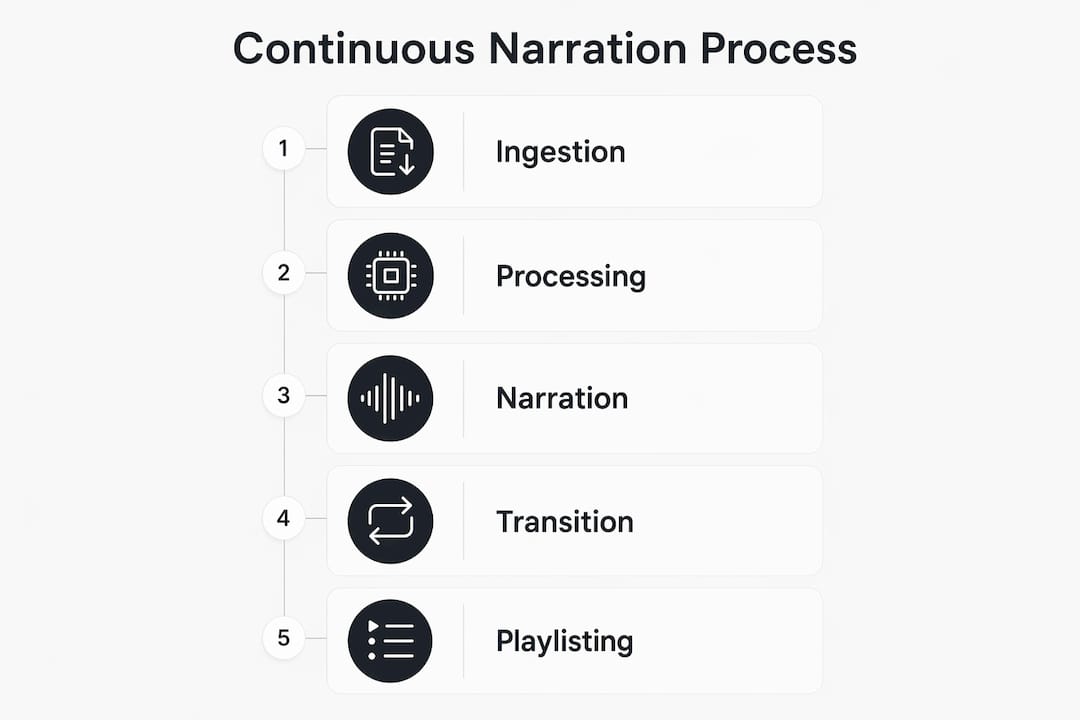
4. Transition bridges. Short audio phrases orient you between items: “Next up, a thread from…” or a one-sentence summary of what just played. Without these, raw TTS feels disjointed because there is no editorial connector between pieces.
5. Playlisting and RSS output. Items are ordered by your rules (priority source first, then by recency or length), assembled into a playlist, and published as a podcast RSS feed. You subscribe once in your podcast app and it stays current.
How to set up your first continuous narration station
Whisprstream makes this process straightforward. Here is the exact setup flow.
- Add your sources. Paste an RSS feed URL, connect your X account, or drop in a newsletter address. You can mix source types in a single station. If you have a read-later backlog, converting saved articles into audio is a good starting point.
- Choose your voice and pacing. Pick a voice from the available options and set your preferred playback speed. Slightly faster pacing (around 1.1–1.2x) works well for news and threads; keep it at 1x for dense longform.
- Set ordering rules. Prioritize newsletters first, then longform articles, then threads. This mirrors how most professionals naturally want to consume information: context first, detail second, quick takes last.
- Enable RSS output. Toggle on the podcast RSS feed in your station settings. Copy the feed URL.
- Subscribe in your podcast app. Paste the RSS URL into Apple Podcasts, Overcast, or Pocket Casts. The station will appear like any other podcast and update automatically.
Common setup issues:
- Missing X items: Re-authenticate your X account if threads stop appearing; OAuth tokens expire.
- Duplicate content: Enable the duplicate filter in station settings if the same article appears from multiple RSS sources.
- Items not updating: Check your refresh interval; some plans update every few hours rather than in real time.
Best practices for keeping your stream coherent
Ordering content thoughtfully is the single biggest lever for narrative flow. Cluster related items together when possible. A thread and a longform article on the same topic back-to-back feel intentional; the same thread sandwiched between two unrelated newsletters feels random.
A few practical rules that hold up well:
- Cap item length. Set a maximum duration per item (around 10–12 minutes) so no single piece dominates a session.
- Use topic filters. If your RSS sources cover multiple beats, filter by keyword to keep a station thematically tight.
- Prioritize by source quality. Weight your most reliable, high-signal sources higher so they always appear early in the queue.
Pro Tip: Enable short transition summaries between items. A one-sentence “what you just heard” bridge before each new piece dramatically reduces the mental reset cost, especially when you are switching from a dense article to a quick thread.
Privacy and copyright considerations in the United States
Before you build a station for personal use or share it publicly, run through this checklist:
- Terms of service: Check whether the RSS feed or newsletter explicitly permits automated ingestion and audio conversion. Many do for personal use; redistribution is a different matter.
- Newsletter permissions: Most newsletter platforms (Substack, Beehiiv) allow personal listening. Public distribution of narrated versions may require explicit permission from the author.
- RSS licensing: RSS is designed for syndication, but audio conversion is a derivative use. When in doubt, keep the station private.
- Fair use boundaries: Personal, non-commercial listening generally falls within fair use under US copyright law. Sharing a narrated station publicly, especially with ads, moves outside that boundary.
- OAuth and account tokens: When you connect an X account, the platform receives a scoped access token. Review what permissions you grant and revoke access for apps you no longer use.
- Public vs. private stations: Whisprstream lets you keep a station private or make it public. Keep it private if you are unsure about redistribution rights.
What to expect on pricing and availability
Whisprstream uses a tiered subscription model. Public stations are free to listen to without an account. Creating your own station, accessing premium voices, increasing usage limits, and enabling HD audio require a paid plan (Premium or Creator tier). Both paid plans are available to users in the United States.
A free trial or freemium entry point lets you build and test a station before upgrading. This is worth doing: spend a week listening to a basic station before deciding whether premium voices or higher refresh rates are worth it for your workflow. The platform is compatible with Apple Podcasts, Overcast, and Pocket Casts out of the box via RSS, so you do not need a new app.
Key Takeaways
Continuous narration turns your personal reading list into a hands-free audio stream that updates automatically, so you can stay informed during any passive moment in your day.
| Point | Details |
|---|---|
| What it is | An AI-powered audio stream that stitches RSS feeds, newsletters, X threads, and articles into one playlist. |
| Core benefit | Reduces context-switching and reclaims passive time during commutes, workouts, and daily routines. |
| How flow is preserved | Entity continuity, scene partitioning, and short transition bridges keep the stream coherent across sources. |
| Setup in three steps | Add sources, enable RSS output, then subscribe in Apple Podcasts, Overcast, or Pocket Casts. |
| Recommended tool | Whisprstream is a US-available platform with multi-source ingestion, AI narration, and podcast-RSS output. |
Why continuous narration is the habit worth building
There is a gap between what most professionals intend to read and what they actually get through. The read-later list grows; the inbox fills. The problem is not motivation. It is format friction. Reading demands your eyes and your full attention. Listening does not.
What strikes me about continuous narration as a concept is that it applies a principle storytellers have used for centuries: sequentiality. The narrative techniques that make a great story compelling, specifically order, timing, and perspective, are exactly what a well-built audio station uses to keep you engaged across 45 minutes of mixed content. The technology is new; the underlying logic is not.
The professionals who get the most out of this are not the ones who set up the most elaborate stations. They are the ones who pick two or three high-signal sources, tune the ordering once, and then just listen. The habit sticks when the setup is simple and the output is genuinely good.
Whisprstream turns your feeds into a daily audio station
Your reading list does not have to stay unread. Whisprstream converts your X threads, RSS feeds, newsletters, and saved articles into a personalized AI-narrated station with natural transitions between every item.
Key features that make it work for busy professionals:
- Multi-source ingestion: RSS, X threads, newsletters, and individual articles in one station.
- AI narration with transitions: Consistent voice and short bridges between items keep the stream coherent.
- Podcast-RSS output: Subscribe in Apple Podcasts, Overcast, or Pocket Casts and listen anywhere.
- Customizable ordering and filters: Set priority rules, length caps, and topic filters to shape your stream.
Try the Daily Digest station for a no-setup preview of what continuous narration sounds like, or build your own station and subscribe in your podcast app today.
Useful sources and further reading
The claims in this guide draw on the following sources. Consult them directly when making redistribution or enterprise-use decisions.
| Source type | Title and link | Best for |
|---|---|---|
| Academic (PNAS) | Quantifying narrative flow in imagined vs. autobiographical stories | Understanding sequentiality and flow research |
| Academic (ACL) | Fiction Flows: Narrative Sequentiality | Entity continuity and engagement design |
| Academic (Cambridge) | Plot extraction and narrative flow visualization | Scene partitioning and transition logic |
| Storytelling guide | The Art of Storytelling | Ordering and pacing principles |
| Narrative techniques | Narrative Techniques | Timing, perspective, and ordering rules |
| Platform docs | Subscribe in podcast apps | Step-by-step RSS subscription setup |
| Platform blog | Whisprstream blog | Use cases and platform updates |
| Broadcast context | Station branding for radio pros | How continuous narration differs from traditional broadcast curation |
Content source types and ingestion methods:
| Source type | Ingestion method | Best use case |
|---|---|---|
| RSS feed | Paste URL into station editor | Blogs, news sites, newsletters with RSS |
| X (Twitter) threads | Connect X account via OAuth | Founder threads, commentary, quick takes |
| Newsletter | Email address or RSS link | Substack, Beehiiv, and similar platforms |
| Saved articles | Paste URL or use browser extension | Read-later backlog, longform pieces |