Audio RSS Feed Explained: A Beginner’s Guide for 2026

An audio RSS feed is a web feed that automatically delivers podcast episodes to any app or directory subscribed to it. Think of it as a live playlist that updates itself every time a creator publishes something new. Your podcast app reads the feed, sees the new episode, and downloads or streams it without you doing a thing.
Here is what every audio RSS feed contains:
- Channel metadata: The show’s title, description, artwork, category, and language
- Episode entries: Individual items with titles, descriptions, publish dates, and durations
- Enclosure tags: The critical XML element that points to the actual audio file, specifying its URL, file size, and MIME type (usually
audio/mpeg) - Feed URL: The permanent web address your app subscribes to, which acts as the single source of truth for all episode data
RSS is the open web of podcasting, giving creators full ownership of their audience. When you own your feed URL, you can switch hosting providers, move to a new platform, or distribute to dozens of directories simultaneously without starting over. No algorithm controls who hears your show.
How to subscribe to and use an audio RSS feed

Getting subscribed takes about two minutes once you have the feed URL in hand.
Finding the feed URL:
- Check the podcast’s website or show notes for a link labeled “RSS,” “Subscribe,” or “Feed”
- Look in your podcast hosting dashboard if you are a creator
- Search the show name in a podcast directory and copy the RSS link from the show’s page
Subscribing in a podcast app:
- Open your preferred app (Apple Podcasts, Overcast, Pocket Casts, or similar)
- Find the “Add by URL” or “Follow a show” option, usually under search or settings
- Paste the feed URL and confirm. The app fetches all existing episodes immediately
Managing your subscriptions:
- Most apps let you set per-show download rules, like auto-downloading only the latest episode
- If a feed stops updating, check whether the creator migrated to a new host and published a redirect
- For troubleshooting playback errors, verify the feed URL is still active by pasting it into a browser. A valid feed returns readable XML
Accessing private feeds:
Private audio RSS feeds require an authentication token embedded in the URL itself. You subscribe the same way, but the URL is unique to your account. You can subscribe to private stations in apps like Overcast, Apple Podcasts, or Pocket Casts, all of which support authenticated feeds.
Pro Tip: Before subscribing to a private feed, confirm your app supports authentication tokens. Not every podcast app handles them correctly, and using an incompatible app may cause episodes to fail silently.
Public vs. private audio RSS feeds: what you need to know
The difference between a public and a private feed shapes everything from who can listen to how you protect your content.
Public feeds are open URLs indexed by every major podcast directory. Once you submit your feed to Apple Podcasts or Spotify, it gets scraped and made searchable. Anyone with the link can access your episodes and all the metadata attached to them. That openness drives discovery, but it also means your show’s title, description, contact email, and episode details are visible to anyone on the internet.
Private feeds work differently. Platforms like Patreon use private RSS feeds to deliver premium podcast content exclusively to paying members. Each subscriber gets a unique URL containing an authorization token. The feed updates automatically with new exclusive episodes, but it only works in apps that support token-based authentication.
A few things creators and listeners should keep in mind:
- Sharing a private feed URL with someone else violates platform terms and can get the link reset or your account suspended
- Private feed links are personal credentials, not shareable links
- Public feeds expose metadata including contact information, so creators should use a dedicated email address rather than a personal one
- Private feeds do not appear in public directories, which protects the content but limits organic discovery
Pro Tip: If you run a private feed, tell your subscribers exactly which apps are compatible. Compatibility varies, and a listener stuck with an unsupported app will churn before they ever hear episode one.
Major podcast platforms that rely on audio RSS feeds
Every major podcast platform is built on RSS at its core, even the ones that have added proprietary layers on top.
- Apple Podcasts: The largest podcast directory in the United States accepts RSS submissions directly. Once approved, it pulls new episodes automatically from your feed
- Spotify: Supports RSS-based distribution and lets creators find and enable their feed through the Spotify for Creators dashboard. Spotify also scrapes public feeds from other directories
- Patreon: Uses private RSS to give paying patrons access to exclusive audio. Each patron’s feed URL is unique and tied to their membership status
- Amazon Music / Audible: Accepts RSS submissions for podcast distribution across its ecosystem
- iHeartRadio and TuneIn: Both ingest RSS feeds to populate their podcast catalogs automatically
When you submit your feed to multiple platforms, each one polls your feed URL on its own schedule, typically every few hours, to check for new episodes. You publish once; every directory updates on its own. That is the core efficiency RSS delivers.
Creators should verify that their feed meets each platform’s metadata requirements before submitting. Missing artwork, an incomplete description, or an unsupported audio format can block approval or cause episodes to display incorrectly.

What the technical specs of an audio RSS feed actually look like
An audio RSS feed is a plain XML file that follows the RSS 2.0 specification, with podcast-specific extensions added by the Podcasting namespace. The key elements every valid feed must include:
| Element | Purpose |
|---|---|
<channel> |
Wraps all show-level metadata |
<title> |
Show name displayed in directories |
<description> |
Show summary, plain text or HTML |
<itunes:image> |
Artwork URL, minimum — |
<item> |
One entry per episode |
<enclosure> |
Audio file URL, byte length, and MIME type |
<itunes:duration> |
Episode length in HH:MM:SS format |
<pubDate> |
Formatted publish date |
The <enclosure> tag is the piece that makes a feed “audio.” Without it, you have a blog feed. With it, podcast apps know exactly where to fetch the audio file and how large it is before downloading. Most platforms also read Apple’s iTunes namespace extensions (itunes:author, itunes:category, itunes:explicit) because Apple Podcasts set the de facto standard years ago and the rest of the industry followed.
Proper feed formatting is critical for discovery and user experience across directories and apps. A feed with missing or malformed metadata will not display correctly, and some directories will reject it outright.
How to create and publish your own audio RSS feed
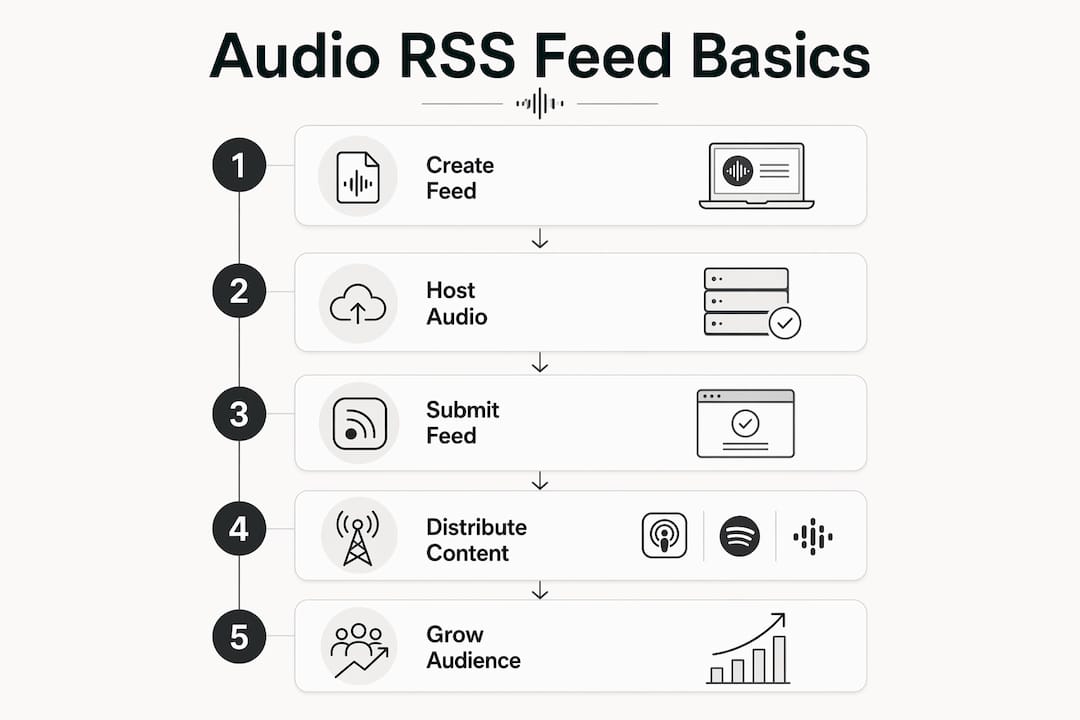
Most creators never write XML by hand. A podcast hosting platform generates and maintains the feed automatically. Here is the practical path:
- Choose a hosting provider. Services like Buzzsprout, Transistor, or Podbean generate a valid RSS feed the moment you create an account and upload your first episode
- Upload your audio file. The host encodes it, stores it, and inserts the correct
<enclosure>tag into your feed automatically - Fill in your metadata. Title, description, category, artwork, and author name all feed directly into your RSS XML
- Grab your feed URL. Every host gives you a permanent feed URL. This is the address you submit to directories
- Submit to directories. Apple Podcasts, Spotify, and Amazon Music each have a submission portal. Paste your feed URL and follow their verification steps
- Publish consistently. Your host updates the feed every time you upload a new episode. Directories poll the feed and reflect the change within hours
If you want to turn an RSS feed into a personal podcast without recording audio yourself, platforms like Whisprstream convert text-based RSS feeds into AI-narrated audio streams automatically. You paste the feed, and Whisprstream handles narration, playback, and distribution.
When migrating hosts, always set up a 301 redirect from your old feed URL to the new one. Directories like Apple Podcasts and Spotify honor the redirect and update their records, so your subscribers never notice the switch.
Best practices for making your audio RSS feed discoverable
Getting your feed indexed is step one. Getting it found by the right listeners takes a bit more intention.
Write for search, not just for listeners. Your show title and description are the primary text directories use to surface your podcast in search results. Include the topic, the audience, and a clear value statement in the first two sentences of your description.
Keep metadata consistent across platforms. If your show title on Apple Podcasts differs from what your RSS feed says, some directories will display conflicting information. Your feed is the authoritative source for all episode data, so treat it that way.
Protect your contact information. Because public feeds are scraped by directories, avoid including personal data like a home address or personal email in your feed metadata. Use a show-specific email address instead.
Use episode-level keywords. Each <item> entry has its own title and description. Treat each one like a short blog post: specific, descriptive, and searchable.
Audio quality shapes retention. When using text-to-speech narration for an RSS-fed audio stream, customizing pace, tone, and pronunciation makes a real difference. Raw TTS without fine-tuning often sounds flat, which pushes listeners away before they finish the episode. Whisprstream’s AI narration is built to handle this, moving naturally between articles, threads, and posts without the robotic cadence that plagues basic converters. You can also explore how to turn web articles into audio for tips on preparing content before it hits your feed.
For creators building an audience through RSS-based content ownership, the feed itself is the asset. Treat it with the same care you give your website.
Key Takeaways
An audio RSS feed is the single most important technical asset a podcaster owns, because it controls distribution to every platform simultaneously.
| Point | Details |
|---|---|
| Feed URL ownership | Your RSS feed URL is yours; switching hosts with a 301 redirect keeps all subscribers intact. |
| Enclosure tag is required | Without a valid <enclosure> tag pointing to an audio file, podcast apps cannot detect or play your episodes. |
| Private feeds need compatible apps | Patreon and similar platforms use token-based private feeds that only work in apps supporting authentication. |
| Metadata drives discovery | Titles, descriptions, and artwork must be complete and accurate for directories to index and display your show correctly. |
| Public feeds expose metadata | Anyone with your feed URL can read all episode metadata, so use a dedicated show email and avoid personal contact details. |